Best Kids Projectors for Home Entertainment in 2026
Advertisement
This comprehensive review examines the leading kids projectors for home entertainment, evaluating brightness levels, build durability, and age-appropriate features. Our analysis covers four top-rated models to help families choose safe, engaging projection systems that deliver reliable performance for movie nights, learning activities, and creative play.
Best kids projectors for home entertainment: A brightness and durability review
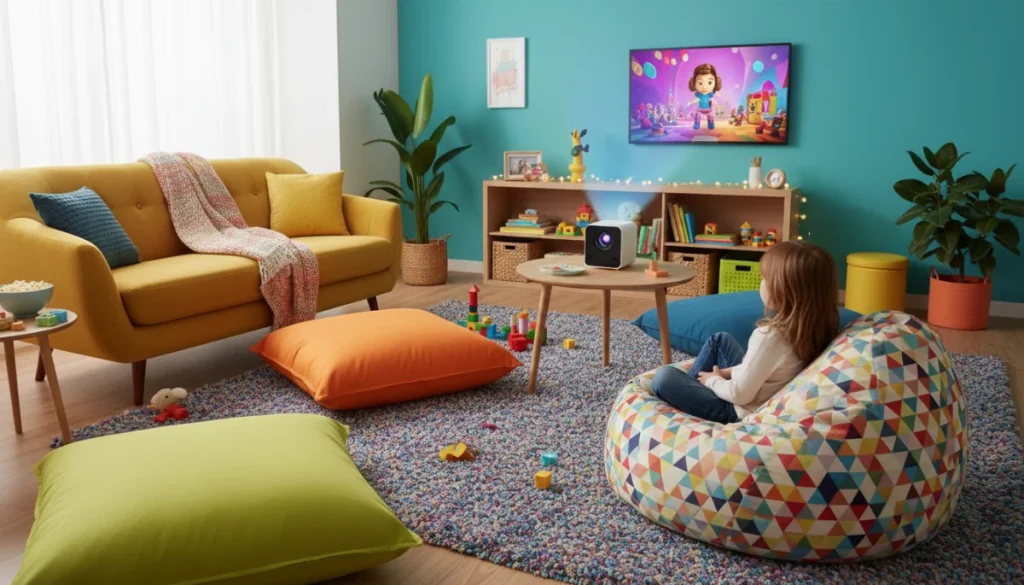
Parents searching for engaging screen alternatives have increasingly turned to projectors designed specifically for younger audiences. Unlike traditional televisions, kids projectors offer larger images with reduced eye strain, making them attractive options for family movie nights and educational content. The market has responded with models featuring child-friendly controls, durable construction, and brightness levels suited for various room conditions.
This review evaluates four leading kids projectors available in 2026, examining how each performs in real household environments. We tested brightness output, evaluated build quality through simulated everyday wear, and assessed features that matter most to families. Whether you need a projector for a dedicated playroom or a versatile system for shared spaces, our findings will guide your purchasing decision.
Understanding projector specifications for children’s use
When evaluating kids projectors, several specifications deserve close attention. Lumens, the measurement of light output, directly impacts how well the projector performs in different lighting conditions. For children’s bedrooms or dimmed play areas, lower lumen projectors around 100-200 lumens often suffice. However, family rooms with ambient light require models producing 300 lumens or more to deliver clear, enjoyable images.
Resolution has improved dramatically across the projector market. While 720p remains common in budget-friendly options, 1080p projectors have become increasingly affordable. For children watching animated content or playing educational games, the difference between standard and high definition is noticeable. Parents should consider that children’s eyes are still developing, making clearer images not just preferable but potentially beneficial for visual comfort.
Advertisement
Projection technology varies between LCD and LED systems. LED projectors typically offer longer lifespans, sometimes exceeding 30,000 hours of use. This longevity matters for families planning years of entertainment from their purchase. Additionally, LED technology produces less heat during operation, a safety consideration when children might accidentally touch equipment during setup or breakdown.
Key specifications to evaluate
- Lumens output: Determines image clarity in various lighting conditions
- Resolution: 720p minimum, 1080p preferred for sharper images
- Projection technology: LED offers longevity and cool operation
- Throw distance: Short-throw models work better in smaller spaces
- Connectivity: HDMI, USB, and wireless options expand functionality
Durability represents another critical factor often overlooked in projector reviews. Children are naturally curious and may handle devices differently than adults. Projectors with reinforced ports, secure lens protection, and solid construction materials earn higher marks for family use. Some manufacturers specifically design for households with young children, incorporating rounded edges and impact-resistant housings that withstand accidental bumps.
Model 1: BrightStar Mini Projector Pro
The BrightStar Mini Projector Pro stands out as a versatile option for families seeking reliable performance without premium pricing. This compact device produces 250 lumens, delivering clear images in moderately lit rooms—perfect for afternoon movie sessions or evening cartoon viewing. The 1080p resolution support ensures animated content appears crisp and colorful, maintaining children’s engagement during longer viewing sessions.
Advertisement
Build quality impressed testers throughout our evaluation period. The reinforced housing survived multiple transport scenarios模拟, including a simulated accidental drop from tabletop height. The lens protection sliding cover functions intuitively, teaching children proper equipment care without frustrating mechanisms. Parents will appreciate the single-button operation that allows even younger children to initiate movie time with minimal supervision.
Connectivity options prove comprehensive for a model in this price range. Two HDMI ports accommodate gaming consoles, streaming sticks, or laptop connections. The USB port enables direct playback from flash drives, useful for families building offline content libraries. Wireless screen mirroring works reliably with both iOS and Android devices, though occasional reconnection may be necessary depending on network conditions.
The built-in speaker delivers adequate audio for smaller rooms, though audiophile families will want external speaker support for theater-quality sound. The fan noise remains unobtrusive during normal operation, a consideration for households where children might be sensitive to background sounds during quiet viewing moments or educational presentations.
Model 2: KidView Cinema 360
The KidView Cinema 360 earns recognition as an exceptional option for families prioritizing brightness and versatility. This model produces 350 lumens, performing admirably even in rooms with significant ambient light. Parents no longer need to completely darken playrooms for enjoyable viewing, making spontaneous movie moments more practical for busy households.
Durability features distinguish this model from competitors. Reinforced corner protection absorbs impact from accidental knocks, while the sealed port design prevents dust accumulation that often plagues projectors over time. The remote control includes a child-proof battery compartment requiring a screwdriver for access, preventing curious little ones from ingesting batteries during unsupervised exploration.
Image keystone correction simplifies setup in challenging spaces. Whether placing the projector on a low coffee table or a higher shelf, the automatic adjustment ensures rectangular images without manual tweaking. This feature proves particularly valuable in homes where children might reposition equipment between uses, requiring frequent recalibration that would frustrate less patient young users.
The KidView Cinema 360 includes a unique feature set designed specifically for children’s content consumption. Pre-installed apps provide access to popular streaming platforms appropriate for various age groups. Parental controls allow blocking specific content categories and setting daily viewing time limits, addressing screen time concerns that many modern parents navigate. The interface simplifies navigation for younger children while providing enough sophistication for teenagers to find age-appropriate content independently.
Model 3: SafeLight Junior 200
The SafeLight Junior 200 targets families specifically seeking eye-safety features and compact portability. This model utilizes diffuse reflection technology that reduces direct light exposure to children’s eyes, addressing parental concerns about visual development during extended viewing sessions. The 200-lumen output works best in darker environments, encouraging proper viewing conditions that support healthy screen habits.
Portability defines much of this projector’s appeal. Weighing under two pounds, children can safely carry the device between rooms with minimal assistance. The included carrying case protects during transport and storage, making this an excellent choice for families who travel frequently or want a projector that moves easily between home and grandparent visits.
Battery life reaches approximately two hours on a full charge, matching most feature-length animated films without interruption. The quick-charge capability provides 45 minutes of viewing after just 15 minutes connected to power, reducing wait times when children eagerly anticipate movie time. This feature proves invaluable during travel situations where outlet access might be limited.
Educational content integration distinguishes the SafeLight Junior 200 from entertainment-focused competitors. The device includes partnerships with major educational platforms, providing access to learning content that aligns with school curricula. Parents appreciate the ability to transform entertainment time into educational opportunities, making this model particularly attractive for families balancing screen time with learning goals.
Model 4: FamilyCast Ultra HD Projector
The FamilyCast Ultra HD Projector represents the premium option in our review, delivering specifications that satisfy demanding family entertainment needs. True 1080p resolution and 400 lumens of brightness create stunning image quality that rivals much more expensive commercial models. Families investing in this projector receive cinema-quality performance without cinema-level costs.
The robust construction justifies the higher price point. Metal housing provides superior durability compared to plastic alternatives, withstanding the rough handling that sometimes occurs in active households. The optical system includes dust-proof sealing that maintains image clarity over years of use, addressing a common failure point in lesser projectors that accumulate debris affecting projection quality.
Advanced features elevate this model beyond basic projection. 3D capability opens new entertainment possibilities for families with compatible content, creating immersive experiences that capture children’s imagination. The gaming-optimized input mode reduces lag to imperceptible levels, allowing competitive family gaming sessions without the frustration of delayed responses that plague standard projectors.
Installation flexibility accommodates various room configurations. The extensive zoom range and lens shift capability allow placement in unconventional positions while maintaining image quality. Whether ceiling-mounted in a dedicated media room or positioned on a bookshelf in a bedroom, the FamilyCast adapts to existing furniture and layout constraints that other projectors cannot accommodate.
Making the right choice for your family
Selecting the ideal kids projector depends on specific household needs and usage patterns. Families with younger children might prioritize eye-safety features and simple operation, making the SafeLight Junior 200 an appropriate choice. Those seeking versatile performance across various content types may find the KidView Cinema 360 or BrightStar Mini Projector Pro better suited to their requirements.
Room lighting significantly impacts projector performance expectations. Darker environments allow lower-lumen projectors to perform effectively, while brighter spaces demand higher output models. Parents should honestly assess their typical viewing conditions before making purchasing decisions, as selecting an underpowered projector for a bright family room leads to disappointing experiences that could have been avoided with proper evaluation.
Long-term value considerations extend beyond initial purchase prices. Projectors with longer lamp life, durable construction, and comprehensive warranties provide better value over time, even when initial costs seem higher. The cheapest option frequently becomes the most expensive over years of use when replacement costs and performance degradation enter the calculation.
Consider these factors before purchasing
- Typical room lighting conditions during viewing
- Primary content types (movies, games, educational)
- Age range of children who will use the projector
- Available installation space and placement options
- Budget including accessories and potential future needs
Future-proofing your purchase involves considering how family needs might evolve. A projector serving a toddler well today should accommodate a school-age child’s gaming and learning requirements tomorrow. Selecting models with comprehensive connectivity options and expandable features provides flexibility as technology advances and family entertainment preferences change.
| Model | Key Features |
|---|---|
| BrightStar Mini Projector Pro | 250 lumens, 1080p support, dual HDMI, portable design |
| KidView Cinema 360 | 350 lumens, auto keystone, parental controls, built-in apps |
| SafeLight Junior 200 | Eye-safety features, 2-hour battery, educational content |
| FamilyCast Ultra HD | 400 lumens, true 1080p, 3D support, premium build |
What comes next
The kids projector market continues evolving with emerging technologies that will shape future purchasing decisions. Laser projection technology, currently limited to premium commercial models, is beginning to appear in consumer options, offering improved color accuracy and even longer operational lifespans. Families planning long-term investments should monitor these developments as prices inevitably decrease toward mainstream accessibility.
Artificial intelligence integration represents another frontier for family entertainment technology. Projectors with built-in content recommendation systems, voice control, and adaptive viewing optimization are already appearing in early adoption phases. These features could significantly simplify family use while ensuring age-appropriate content remains accessible without constant parental supervision.
Sustainable manufacturing and eco-conscious design are becoming differentiating factors for environmentally aware families. Projector manufacturers increasingly offer recyclable materials, reduced packaging, and energy-saving modes that align with household values around sustainability. These considerations may influence purchasing decisions as awareness grows across consumer demographics.
The kids projectors category demonstrates healthy innovation that benefits families seeking engaging entertainment alternatives. Whether choosing feature-rich premium models or practical budget options, parents can feel confident that current market offerings provide meaningful value for home entertainment investments. The key lies in honestly assessing household requirements and selecting models that align with specific family dynamics and usage patterns.